
Executive SummaryWe discovered a vulnerability in the Google Cloud Vertex AI softw 2026-6-16 10:0:29 Author: unit42.paloaltonetworks.com(查看原文) 阅读量:5 收藏
Executive Summary
We discovered a vulnerability in the Google Cloud Vertex AI software development kit (SDK) for Python, and responsibly disclosed it to Google. Before Google’s fix, the vulnerability would have allowed an attacker operating entirely from their own Google Cloud project to hijack a victim's model upload and poison it. By exploiting this flaw in vulnerable versions of the SDK, an attacker can achieve remote code execution (RCE) within a target’s Vertex AI serving infrastructure, with zero initial access to the victim's project.
The root enabler of this attack is a predictable default bucket name, combined with a missing ownership check in the SDK's staging logic. When a Vertex AI user uploads a model without specifying a custom staging bucket, the SDK constructs a bucket name using a deterministic pattern based on the project ID and region.
An attacker who knows the victim's project ID can preemptively create this bucket in their own project, a technique known as bucket squatting. The SDK then silently uploads the victim's model artifacts to the attacker-controlled bucket. Subsequently, within a narrow window of opportunity, the attacker replaces the legitimate model with one that carries a malicious payload. Once the victim deploys the compromised model, the attacker's code executes. In vulnerable SDK versions, this can lead to data exfiltration, lateral movement and further compromise of the victim's cloud environment.
We refer to the process of exploiting this vulnerability as Pickle in the Middle because it relies in part on deserializing a built-in module called pickle, as explained below in Pickle Deserialization as Attack Vector.
We reported the vulnerability to the Google security team, and they accepted our findings. The issue affected google-cloud-aiplatform SDK versions 1.139.0 and 1.140.0, which was the latest at the time of testing. Google completed the fixes to address this issue in v1.148.0, which was released April 15, 2026.
We recommend that developers upgrade to fixed versions of the SDK.
The Unit 42 AI Security Assessment and Unit 42 Frontier AI Defense service can help identify and mitigate complex AI-specific risks.
If you think you might have been compromised or have an urgent matter, contact the Unit 42 Incident Response team.
Background and Terminology
Vertex AI is a machine learning platform for training and deploying ML models and AI applications. The Vertex AI SDK for Python is the primary client library that developers use to interact with the platform programmatically. We focused our research on the Vertex AI SDK for Python (google-cloud-aiplatform), as many enterprises rely on it to create and manage their AI/ML pipelines, applications and models.
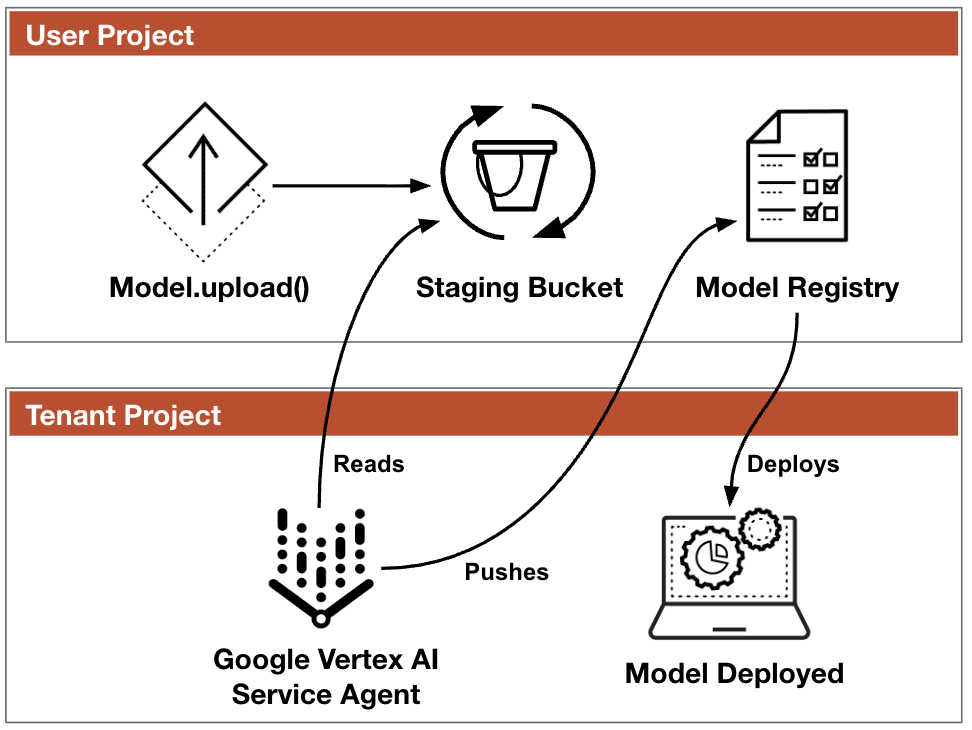
The Vertex AI Model Registry is a centralized repository within Vertex AI where users store, version and manage their ML models. When a user uploads a model to the Model Registry via the SDK, the SDK first stages the model artifacts in a Google Cloud Service (GCS) bucket before registering them with the service. The Model Registry then references these staged artifacts. When the model is deployed to an endpoint, Google's internal infrastructure (specifically, a Per-Product, Per-Project Service Account or P4SA) loads them into a serving container. Figure 1 shows the intended model upload flow.
Bucket Squatting
Bucket squatting is a class of vulnerability that takes advantage of the global uniqueness of cloud storage bucket names. Since no two buckets across all of Google Cloud can share the same name, an attacker who is able to predict a bucket name can preemptively create it in their own project. Any subsequent attempt to use a bucket with that name, even from a different project, silently falls back to the attacker's bucket.
Service Agents and Tenant Project
In Google Cloud, many managed services operate through service agents (P4SAs). These are Google-managed service accounts that allow Google Cloud services to access resources. In the case of Vertex AI, the P4SA is responsible for reading model artifacts from the staging bucket and loading them into the serving infrastructure.
Tenant projects are Google Cloud projects that are owned by Google and used to host resources of a managed service. The identities and resources available inside these tenant projects are important aspects to research because they bridge the boundary between Google's infrastructure and the customer's resources. Vertex AI uses tenant projects to host resources such as Kubernetes clusters, containers and service accounts that allow the service to function.
Pickle Deserialization as Attack Vector
Joblib is a set of tools that provides lightweight pipelining in Python. pickle is a built-in module used for serializing and deserializing object structures. ML models in the Python ecosystem are commonly serialized using pickle – or its Joblib wrapper. A critical property of pickle is that deserialization can be leveraged to execute code. Specifically, Python's pickle protocol supports a __reduce__ method that defines how an object should be reconstructed. An attacker who controls a pickle file can define a __reduce__ method that executes arbitrary Python code the moment joblib.load() or pickle.load() is called, before any type of validation occurs. This is a well-known property of pickle (and joblib), and it is the mechanism we used to turn model poisoning into remote code execution.
The Vulnerability
The Vertex AI SDK for Python model upload functionality is vulnerable to bucket squatting in versions 1.139.0 and 1.140.0, the latest versions that were available at the time of testing. When a user does not explicitly provide a staging bucket name, the SDK constructs a bucket name deterministically from the project ID and region, and then checks whether the bucket exists. If the bucket does not exist, the SDK creates it. However, if the bucket exists, the SDK does not verify whether the bucket belongs to the caller's project. This means that an attacker can create a bucket with the same name in their own project, and then wait for the victim to upload a model. Once uploaded, the attacker can replace it with a malicious model. This model carries a payload that executes arbitrary code when deployed and loaded, abusing the pickle deserialization mechanism.
Discovery Methodology
As part of this research, we incorporated a large language model (LLM) into the discovery and code-analysis phase. Analysis that once took days can now be executed significantly faster. By iteratively narrowing the model's focus and instructing it to look for specific patterns, we found paths that led to resources provisioned on the cloud, affected by user-controlled or project-derived inputs.
The vulnerable code was located in gcs_utils.py, inside the stage_local_data_in_gcs() function:
staging_bucket_name = project + "-vertex-staging-" + location # ← Deterministic predictable name client = storage.Client(project=project, credentials=credentials) staging_bucket = storage.Bucket(client=client, name=staging_bucket_name) if not staging_bucket.exists(): # ← Only checks existence, NOT ownership staging_bucket = client.create_bucket(...) staging_gcs_dir = "gs://" + staging_bucket_name |
The function constructs the bucket name deterministically from the project ID and region (e.g., my-project-vertex-staging-us-central1). It then calls staging_bucket.exists() to check whether the bucket already exists. The bucket.exists() call returns True for any bucket with that name, regardless of which project owns it.
If the bucket exists, even in a completely different project, the SDK proceeds to upload model artifacts to it without any further verification. Once the model is uploaded, the attacker has a limited window of opportunity to replace it with a compromised one. This malicious model carries a payload that executes arbitrary code when the model is deployed and loaded. After this window, the AI Platform Service Agent ([email protected][.]com) reads the model and the attacker loses their ability to replace it. Our tests show that this window is approximately 2.5 seconds, requiring near-real-time attacker operation, as shown in Phases 2-4 below.
The Attack Chain
Prerequisites
The success of this attack depends on the following conditions:
- The victim’s default staging bucket does not already exist in the target region. This is the case for any project that has not yet used Vertex AI in that region or has not used the default staging bucket name.
- The victim does not specify an explicit staging_bucket parameter when calling SDK methods like Model.upload(). When no bucket is specified, the SDK falls back to the deterministic default name.
- On the attacker's side, the only requirements are a Google Cloud project – in any organization, using any billing account – and knowledge of the victim's project ID, which is often publicly discoverable.
High-Level Flow
The flow of attack phases reflects the key findings of our research:
- Predictable bucket name and lack of ownership verification, enabling bucket squatting
- Race condition window that can be exploited to hijack the model upload
- Pickle deserialization as an RCE vector
Phase 1: Bucket Squatting
The attacker preemptively creates a bucket with the predicted name of the target's staging bucket, in the attacker's own project. The attacker then configures identity and access management (IAM) permissions so that any authenticated Google Cloud identity can read from and write to the attacker’s bucket. This is critical, as the victim's identity (that uploads the model) and Vertex AI’s service agent (which reads the model) must both be able to interact with the bucket.
The code snippet below illustrates how any authenticated user could interact with the bucket.
BUCKET="${VICTIM_PROJECT}-vertex-staging-${REGION}" gcloud storage buckets create "gs://${BUCKET}" \ --project="${ATTACKER_PROJECT}" --location="${REGION}" \ --uniform-bucket-level-access # Allow any authenticated user to interact with the bucket gcloud storage buckets add-iam-policy-binding "gs://${BUCKET}" \ --member="allAuthenticatedUsers" --role="roles/storage.legacyBucketReader" gcloud storage buckets add-iam-policy-binding "gs://${BUCKET}" \ --member="allAuthenticatedUsers" --role="roles/storage.objectCreator" gcloud storage buckets add-iam-policy-binding "gs://${BUCKET}" \ --member="allAuthenticatedUsers" --role="roles/storage.objectViewer" |
The legacyBucketReader role ensures that when the victim’s SDK checks whether the bucket exists, the bucket.exists() returns a True response. The objectCreator role allows the victim's SDK to upload artifacts. The objectViewer role allows the Vertex AI service agent to read the artifacts later.
Phase 2: Preparing the Model Replacement Function
The attacker deploys a Cloud Function, which is a serverless compute service in Google Cloud that executes code in response to events. The function is configured with a trigger on google.storage.object.finalize, which fires every time a new object is created (or overwritten) in the specified bucket. This means that the function automatically executes whenever the victim uploads a model artifact to the squatted bucket.
The attacker-created Cloud Function's logic is straightforward. When it detects a new model.joblib file in a vertex_ai_auto_staging path, it downloads the original file and replaces it with a pre-generated malicious payload.
The malicious payload is a joblib serialized Python object with a crafted __reduce__ method. To check the usage of this method, we set up a webhook that receives the victim's service account credentials. When the model is deserialized, it executes code that queries the Google Compute Engine (GCE) metadata server for the serving container's service account credentials and exfiltrates them to an attacker-controlled endpoint.
The reason we use a Cloud Function rather than polling the bucket is timing. According to our tests, the window between the victim's upload and the service agent read is approximately 2.5 seconds. A Cloud Function triggered by google.storage.object.finalize reacts within approximately 800 ms, leaving enough time to replace the file before the service agent reads it. In this way, the attacker wins the race. The victim uploads a legitimate model, but by the time the service agent reads it, the file has been swapped.
Phase 3: Victim Uploads a Model
The victim runs standard SDK code, without unusual configuration or security mistakes, as shown in the following code block:
aiplatform.init(project="victim-project", location="us-central1") vertex_model = aiplatform.Model.upload( display_name="my-model", artifact_uri=local_model_dir, serving_container_image_uri="us-docker.pkg.dev/vertex-ai/prediction/sklearn-cpu.1-0:latest", ) |
Because no staging_bucket is specified, the SDK constructs the default name, finds that the bucket exists (which the attacker prepared in Phase 1) and uploads the model artifacts to the existing bucket’s location – the attacker’s project.
Phase 4: The Replacement
As a result of the victim's upload, the Cloud Storage finalize event triggers the attacker's Cloud Function, which immediately replaces the victim's legitimate model with the malicious payload. The entire swap occurs within the opportunity window, well before the P4SA reads the artifact. The service agent then reads the poisoned model instead of the original one, without the victim's knowledge.
The following timeline, captured from our proof of concept, illustrates the replacement flow:
T+0 ms Victim SDK uploads model.joblib (601 bytes)
T+804 ms Cloud Function detects new model
T+1,433 ms Cloud Function replaces new model with RCE payload (601→2,945 bytes)
T+2,460 ms P4SA reads the REPLACED model from the staging bucket
Phase 5: Victim Deploys the Model
The victim deploys the model to an endpoint using standard SDK calls, as shown in the following code block:
endpoint = aiplatform.Endpoint.create(display_name="my-endpoint") vertex_model.deploy(endpoint=endpoint, machine_type="n1-standard-2", min_replica_count=1, max_replica_count=1) |
The victim has no indication that the model artifacts were tampered with.
Phase 6: Code Execution
When the serving container starts, it calls joblib.load() to deserialize the model. The __reduce__ method in the poisoned payload executes immediately, before the container performs any type validation on the loaded object. In our proof of concept, the payload:
- Queries the GCE metadata server for the service account email and OAuth access token
- Collects container environment variables (such as project number, endpoint ID, Kubernetes metadata)
- Exfiltrates the credentials to an attacker-controlled webhook
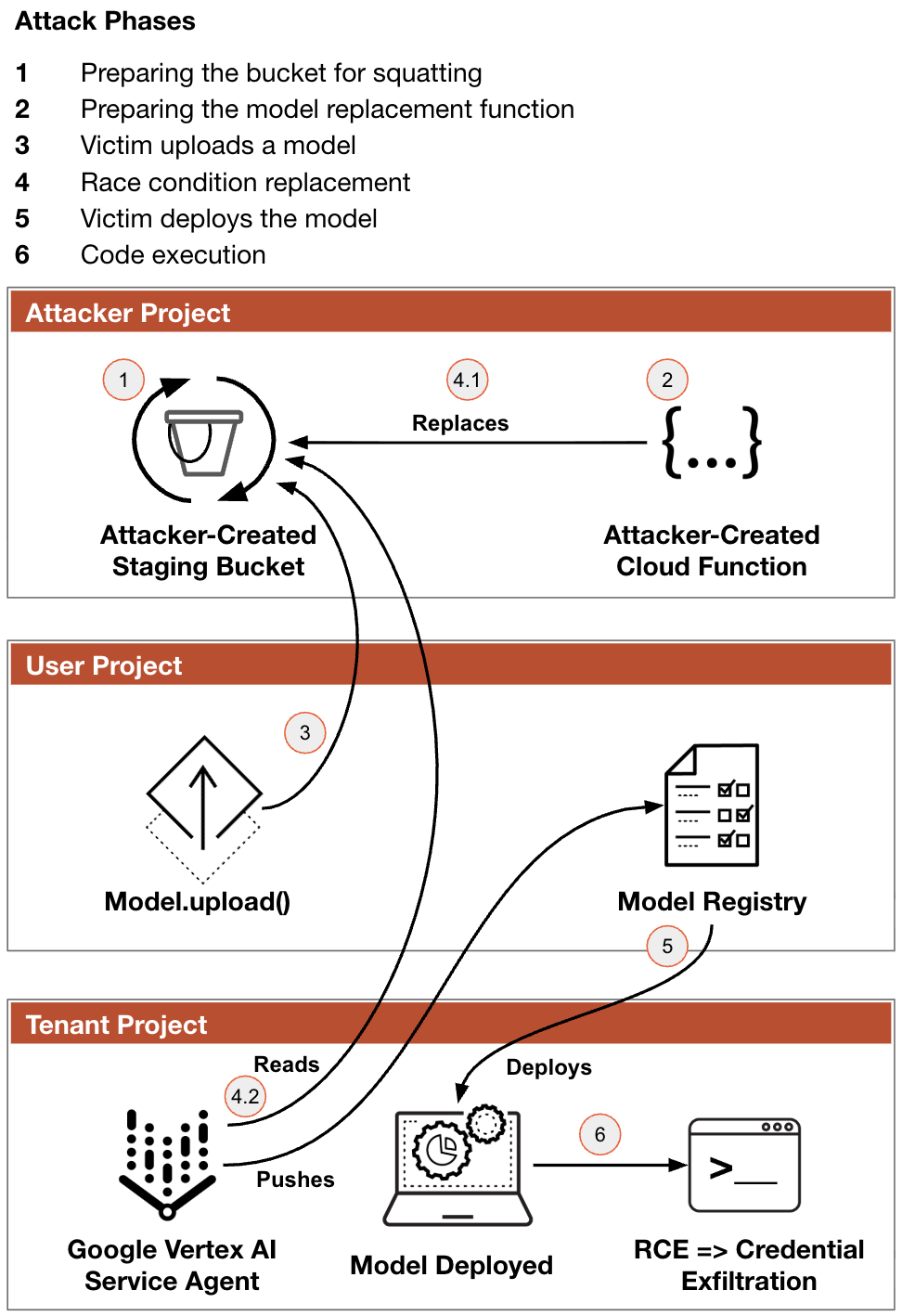
Figure 2 shows the six phases of the attack chain.
Token Exfiltration, Post-Exploitation and Impact
The OAuth token that was exfiltrated to the attacker’s webhook belongs to a service account running in Google's managed tenant project, named custom-online-prediction@<tenant-project>.iam.gserviceaccount[.]com. This token has cloud-platform scope – the broadest possible scope in Google Cloud.
We found that this token allows access to several tenant project resources that extend well beyond the scope of the individual deployment:
- Cross-deployment model theft: The service account can access GCS buckets belonging to other model deployments within the same tenant project. In our testing environment, we were able to discover and read model artifacts from other deployments, including a complete TensorFlow model with trained weights.
- BigQuery reconnaissance: The token can enumerate all BigQuery datasets and table names in the victim's project, and read dataset access control lists. This exposes data schema, naming conventions and the identities of other service accounts with data access. This is valuable information for lateral movement.
- Tenant infrastructure intelligence: The token can read Cloud Logging from the Google-managed tenant project, revealing internal infrastructure details like:
- Google Kubernetes Engine (GKE) cluster names
- Active prediction deployments from other workloads
- Google-internal container image URIs
- Kubernetes system identities
Mitigation and Collaboration With Google
We reported this vulnerability to the Google security team. Google deployed fixes in v1.144.0 on March 31, 2026 and in v1.148.0 on April 15, 2026.
Figure 3 shows the first fix: the addition of a uuid4 variable with a randomly generated value to the end of the bucket naming routine in the gcs_utils.py script.
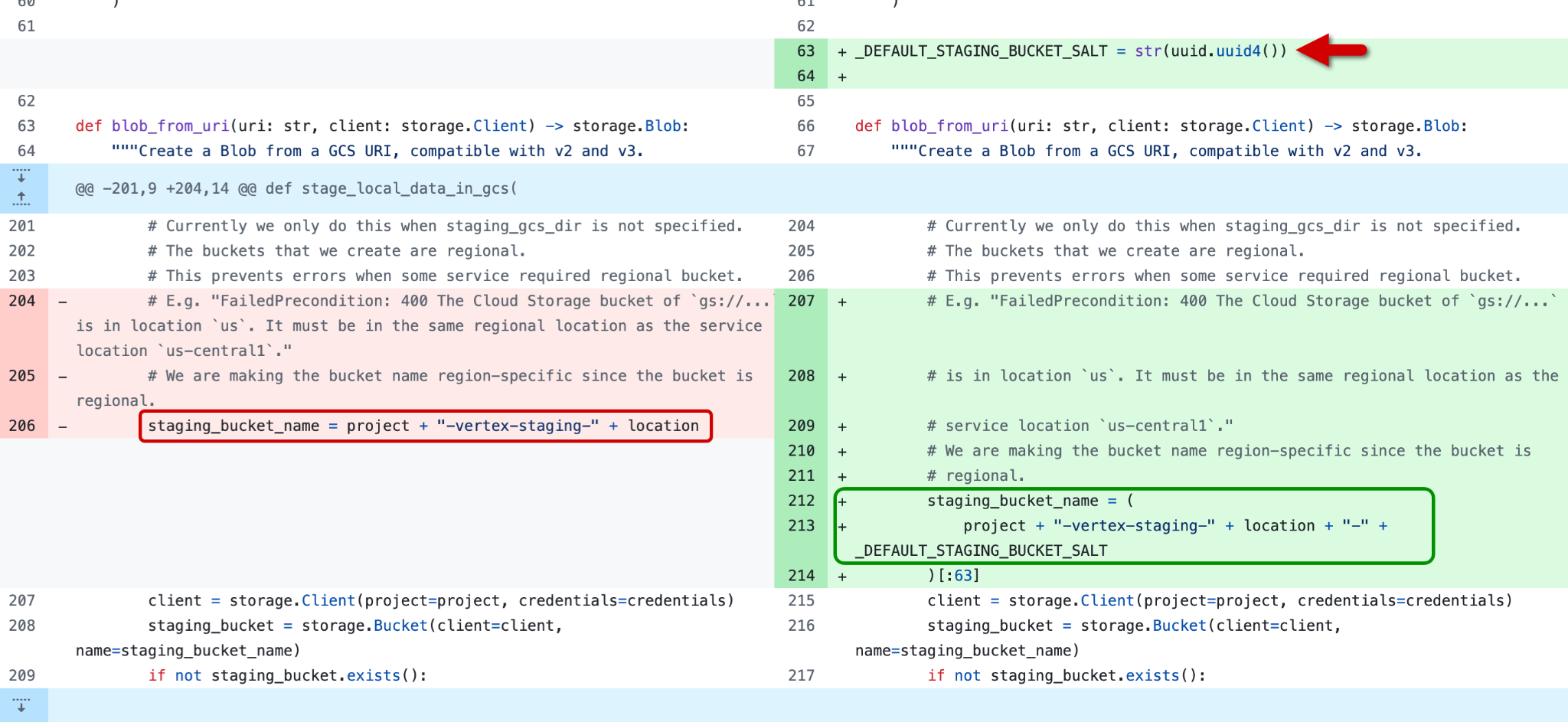
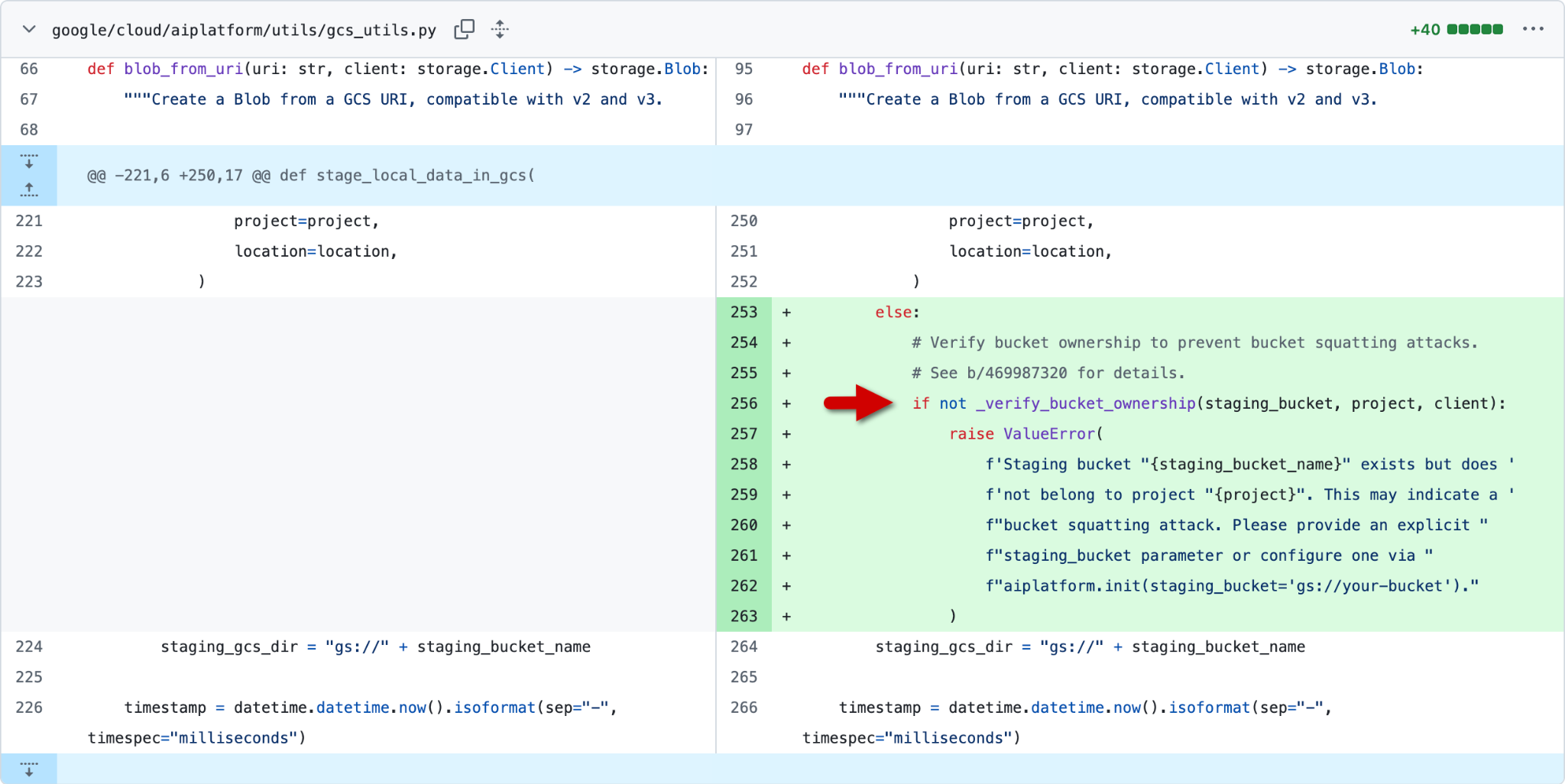
Figure 4 shows the second fix: the addition of a bucket ownership verification check to the gcs_utils.py script.
Disclosure Timeline
- March 5, 2026: Vulnerability reported to Google Cloud via the Vulnerability Reward Program
- March 9, 2026: Google assigned top priority to the report
- March 10, 2026: Google acknowledged the vulnerability, assigned top severity and reported to the product team
- March 31, 2026: Google deployed the first fix to production
- April 15, 2026: Google deployed the second fix to production
Conclusion
The growing role of AI in production systems highlights the importance of continuously examining the security resilience of the platforms that support it. This research is one contribution to that effort, and we appreciate Google's collaboration in resolving the vulnerability.
Our research shows that cloud security extends into the developer toolchain and machine learning model lifecycle. The vulnerability that we discovered demonstrates how seemingly minor design flaws can lead to a critical security issue. In vulnerable versions of the SDK, this attack requires no access to the victim's project and no social engineering tactics, and could result in model poisoning, credential theft and cross-tenant compromise.
Google Cloud worked closely with Palo Alto Networks Unit 42 to resolve this issue through our Vulnerability Rewards Program (VRP). They deployed a permanent fix for the Vertex AI SDK for Python in version 1.148.0 on April 15, 2026.
We recommend that all developers update their SDK to version 1.148.0 or later to ensure the new bucket ownership checks are active. As an added best practice, when specifying an artifact_uri that isn't set to a Cloud Storage (gs://) location, users should set the staging_bucket parameter to a Cloud Storage location to help ensure full asset isolation.
Palo Alto Networks Protection and Mitigation
Palo Alto Networks customers are better protected from the threats discussed above through the following products:
Cortex Cloud
- Organizations are better equipped to close the AI security gap through the deployment of Cortex AI-SPM, which delivers comprehensive visibility and posture management for AI agents across AWS, Azure and GCP environments, as described within this article. Cortex AI-SPM is designed to mitigate critical risks including, over-privileged AI agent access, misconfigurations, and unauthorized data exposure. Cortex AI-SPM enables security teams to enforce compliance with NIST and OWASP standards, monitor for real-time behavioral anomalies, and secure the entire AI lifecycle within a unified cloud security context.
- Cortex Cloud Identity Security can also protect organizations from the techniques discussed in the article. Identity Security encompasses:
- Cloud Infrastructure Entitlement Management (CIEM)
- Identity Security Posture Management (ISPM)
- Data Access Governance (DAG)
- Identity Threat Detection and Response (ITDR)
The Unit 42 AI Security Assessment and Unit 42 Frontier AI Defense service can help identify and mitigate complex AI-specific risks.
If you think you may have been compromised or have an urgent matter, get in touch with the Unit 42 Incident Response team or call:
- North America: Toll Free: +1 (866) 486-4842 (866.4.UNIT42)
- UK: +44.20.3743.3660
- Europe and Middle East: +31.20.299.3130
- Asia: +65.6983.8730
- Japan: +81.50.1790.0200
- Australia: +61.2.4062.7950
- India: 000 800 050 45107
- South Korea: +82.080.467.8774
Palo Alto Networks has shared these findings with our fellow Cyber Threat Alliance (CTA) members. CTA members use this intelligence to rapidly deploy protections to their customers and to systematically disrupt malicious cyber actors. Learn more about the Cyber Threat Alliance.
Additional Resources
- Gemini Enterprise Agent Platform – Google Cloud documentation
- Python SDK for Vertex AI – Google Cloud GitHub
- Glossary – Tenant Project – Google Cloud documentation
- Joblib: running Python functions as pipeline jobs – Joblib
- Pickle – Python object serialization – Python documentation
- Models & datasets – TensorFlow documentation
- v1.148.1 Vulnerability Fix – Vertex AI Python SDK release notes
如有侵权请联系:admin#unsafe.sh